Tutorial 5: Logistic regression + Grid search for hyperparameter tuning

Author: Alejandro Monroy
In this tutorial we are going to explore a widely used classification algorithm: logistic regression. In addition, we will also learn about grid search, a powerful technique for hyperparameter tuning to optimize model performance.
1. Loading and preparing the data
We will use the breast_cancer dataset from Sklearn, which contains 30 numerical features and a binary target.
[1]:
from sklearn.datasets import load_breast_cancer
from sklearn.model_selection import train_test_split
from sklearn.preprocessing import StandardScaler

# Loading the dataset
breast = load_breast_cancer()
X, y = breast.data, breast.target

print(breast.DESCR)
.. _breast_cancer_dataset:

Breast cancer wisconsin (diagnostic) dataset
--------------------------------------------

**Data Set Characteristics:**

:Number of Instances: 569

:Number of Attributes: 30 numeric, predictive attributes and the class

:Attribute Information:
    - radius (mean of distances from center to points on the perimeter)
    - texture (standard deviation of gray-scale values)
    - perimeter
    - area
    - smoothness (local variation in radius lengths)
    - compactness (perimeter^2 / area - 1.0)
    - concavity (severity of concave portions of the contour)
    - concave points (number of concave portions of the contour)
    - symmetry
    - fractal dimension ("coastline approximation" - 1)

    The mean, standard error, and "worst" or largest (mean of the three
    worst/largest values) of these features were computed for each image,
    resulting in 30 features.  For instance, field 0 is Mean Radius, field
    10 is Radius SE, field 20 is Worst Radius.

    - class:
            - WDBC-Malignant
            - WDBC-Benign

:Summary Statistics:

===================================== ====== ======
                                        Min    Max
===================================== ====== ======
radius (mean):                        6.981  28.11
texture (mean):                       9.71   39.28
perimeter (mean):                     43.79  188.5
area (mean):                          143.5  2501.0
smoothness (mean):                    0.053  0.163
compactness (mean):                   0.019  0.345
concavity (mean):                     0.0    0.427
concave points (mean):                0.0    0.201
symmetry (mean):                      0.106  0.304
fractal dimension (mean):             0.05   0.097
radius (standard error):              0.112  2.873
texture (standard error):             0.36   4.885
perimeter (standard error):           0.757  21.98
area (standard error):                6.802  542.2
smoothness (standard error):          0.002  0.031
compactness (standard error):         0.002  0.135
concavity (standard error):           0.0    0.396
concave points (standard error):      0.0    0.053
symmetry (standard error):            0.008  0.079
fractal dimension (standard error):   0.001  0.03
radius (worst):                       7.93   36.04
texture (worst):                      12.02  49.54
perimeter (worst):                    50.41  251.2
area (worst):                         185.2  4254.0
smoothness (worst):                   0.071  0.223
compactness (worst):                  0.027  1.058
concavity (worst):                    0.0    1.252
concave points (worst):               0.0    0.291
symmetry (worst):                     0.156  0.664
fractal dimension (worst):            0.055  0.208
===================================== ====== ======

:Missing Attribute Values: None

:Class Distribution: 212 - Malignant, 357 - Benign

:Creator:  Dr. William H. Wolberg, W. Nick Street, Olvi L. Mangasarian

:Donor: Nick Street

:Date: November, 1995

This is a copy of UCI ML Breast Cancer Wisconsin (Diagnostic) datasets.
https://goo.gl/U2Uwz2

Features are computed from a digitized image of a fine needle
aspirate (FNA) of a breast mass.  They describe
characteristics of the cell nuclei present in the image.

Separating plane described above was obtained using
Multisurface Method-Tree (MSM-T) [K. P. Bennett, "Decision Tree
Construction Via Linear Programming." Proceedings of the 4th
Midwest Artificial Intelligence and Cognitive Science Society,
pp. 97-101, 1992], a classification method which uses linear
programming to construct a decision tree.  Relevant features
were selected using an exhaustive search in the space of 1-4
features and 1-3 separating planes.

The actual linear program used to obtain the separating plane
in the 3-dimensional space is that described in:
[K. P. Bennett and O. L. Mangasarian: "Robust Linear
Programming Discrimination of Two Linearly Inseparable Sets",
Optimization Methods and Software 1, 1992, 23-34].

This database is also available through the UW CS ftp server:

ftp ftp.cs.wisc.edu
cd math-prog/cpo-dataset/machine-learn/WDBC/

.. dropdown:: References

  - W.N. Street, W.H. Wolberg and O.L. Mangasarian. Nuclear feature extraction
    for breast tumor diagnosis. IS&T/SPIE 1993 International Symposium on
    Electronic Imaging: Science and Technology, volume 1905, pages 861-870,
    San Jose, CA, 1993.
  - O.L. Mangasarian, W.N. Street and W.H. Wolberg. Breast cancer diagnosis and
    prognosis via linear programming. Operations Research, 43(4), pages 570-577,
    July-August 1995.
  - W.H. Wolberg, W.N. Street, and O.L. Mangasarian. Machine learning techniques
    to diagnose breast cancer from fine-needle aspirates. Cancer Letters 77 (1994)
    163-171.
[2]:
# Train-test split
X_train, X_test, y_train, y_test = train_test_split(X, y, test_size=0.2, random_state=42)

# Standarization of the featues
scaler = StandardScaler()
X_train = scaler.fit_transform(X_train)
X_test = scaler.transform(X_test)

print(f"Training set size: {X_train.shape}")
print(f"Testing set size: {X_test.shape}")
Training set size: (455, 30)
Testing set size: (114, 30)
2. Logistic regression (binary case)
Logistic regression is a statistical model for datasets in which there are one or more independent variables that determine and a binary outcome.
The logistic function is defined as:
where (\(z\)) is the linear combination of the input features and their corresponding coefficients:
The probability of the outcome can be written as:
So, in short, what we are doing is to apply linear regression to compute the logit (\(z\)) that is fed into the logistic function (\(\sigma\)) to get the probability of class \(1\). We can then compare that probability with a threshold (usually \(0.5\)) to get the predicted class (so we predict class \(1\) if the probability is above the threshold and \(0\) otherwise).
The coefficients (\(\beta_0, \beta_1, \ldots, \beta_n\)) are estimated using maximum likelihood estimation on the cross-entropy loss:
The model is available in the sklearn.linear_model module:
[3]:
from sklearn.linear_model import LogisticRegression
from sklearn.metrics import accuracy_score

# Initialize the logistic regression model
log_reg = LogisticRegression()

# Fit the model on the training data
log_reg.fit(X_train, y_train)

# Predict on the test set
y_pred = log_reg.predict(X_test)

# Evaluate the model
accuracy = accuracy_score(y_test, y_pred)
print(f"Accuracy: {accuracy:.4f}")
Accuracy: 0.9737
As we did in linear regression, we can retrive the parameters of the model for interpretability purposes:
[4]:
print("Coefficients: ", log_reg.coef_)
print("Intercept: ", log_reg.intercept_)
Coefficients:  [[-0.43190368 -0.38732553 -0.39343248 -0.46521006 -0.07166728  0.54016395
  -0.8014581  -1.11980408  0.23611852  0.07592093 -1.26817815  0.18887738
  -0.61058302 -0.9071857  -0.31330675  0.68249145  0.17527452 -0.3112999
   0.50042502  0.61622993 -0.87984024 -1.35060559 -0.58945273 -0.84184594
  -0.54416967  0.01611019 -0.94305313 -0.77821726 -1.20820031 -0.15741387]]
Intercept:  [0.44558453]
2. Cross validation and Grid Search for hyperparameter tuning
Cross-validation is a technique used to evaluate the performance of a machine learning model by splitting the dataset into multiple subsets (folds). The model is trained on some folds and tested on the remaining fold(s). This process is repeated multiple times, and the results are averaged to provide a more reliable estimate of the model’s performance.
Grid Search is a method for hyperparameter tuning that systematically searches through a predefined set of hyperparameter values. It evaluates the model’s performance for each combination of hyperparameters using cross-validation and selects the combination that yields the best performance. This ensures that the model is optimized for the given dataset.
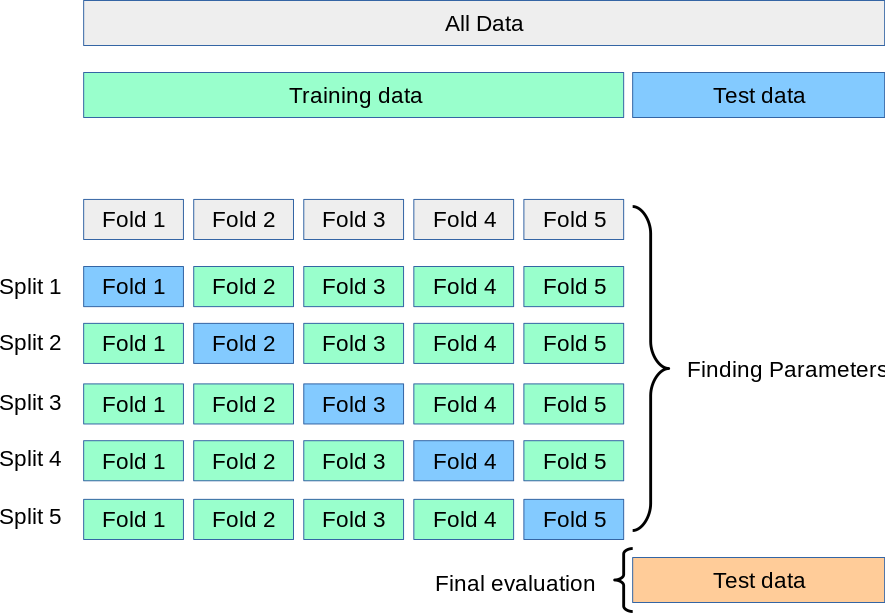
The diagram below illustrates the hyperparameter search procedure via 5-fold cross-validation:
 Source: scikit-learn.org
The training set is divided into 5 folds, and the model is trained and validated 5 times—each time using a different fold as the validation set and the remaining 4 folds as the training set. This process is repeated for each combination of hyperparameters under consideration.
The average validation performance across these 5 splits is used to select the best set of hyperparameters. Once the best parameters are identified, a final model is trained on the entire training set (i.e., all 5 folds), and this final model is then evaluated on the held-out test set, which was never seen during training or validation.
Let’s use grid search to find the best parameters of a random forest model for breast cancer prediction. First, we define our grid as a dictionary where keys are the names of the parameters and the values are the list of values to test for each parameter:
[5]:
rf_param_grid = {
    'n_estimators': [25, 50, 75, 100, 200],
    'max_depth': [None, 5, 10, 20],
    'min_samples_split': [None, 2, 5, 10]
}
Then, we just need to initialize our model and a GridSearchCV object and fit it to the training data. The cv parameter indicates the number of folds used for cross-validation, and scoring is the evaluation metric.
[6]:
from sklearn.ensemble import RandomForestClassifier
from sklearn.model_selection import GridSearchCV

# Define parameter grid for Random Forest
rf_param_grid = {
    'n_estimators': [25, 50, 75, 100, 200, 300],
    'max_depth': [None, 5, 10, 20],
    'min_samples_split': [2, 5, 10]
}

rf = RandomForestClassifier()

grid_search = GridSearchCV(rf, rf_param_grid, cv=5, scoring='accuracy')
grid_search.fit(X_train, y_train)
[6]:
GridSearchCV(cv=5, estimator=RandomForestClassifier(),
             param_grid={'max_depth': [None, 5, 10, 20],
                         'min_samples_split': [2, 5, 10],
                         'n_estimators': [25, 50, 75, 100, 200, 300]},
             scoring='accuracy')
In a Jupyter environment, please rerun this cell to show the HTML representation or trust the notebook. On GitHub, the HTML representation is unable to render, please try loading this page with nbviewer.org.
GridSearchCV(cv=5, estimator=RandomForestClassifier(),
             param_grid={'max_depth': [None, 5, 10, 20],
                         'min_samples_split': [2, 5, 10],
                         'n_estimators': [25, 50, 75, 100, 200, 300]},
scoring='accuracy')RandomForestClassifier(n_estimators=75)
RandomForestClassifier(n_estimators=75)
After fitting the grid search, we can access the best parameters and the best validation score:
[7]:
best_params = grid_search.best_params_
best_validation_accuracy = grid_search.best_score_

print("Best parameters:", best_params)
print(f"Best cross-validation accuracy: {best_validation_accuracy:.4f}")
Best parameters: {'max_depth': None, 'min_samples_split': 2, 'n_estimators': 75}
Best cross-validation accuracy: 0.9626
Finally, we can compute the score of the best model on the test set:
[8]:
best_model = grid_search.best_estimator_

y_pred = best_model.predict(X_test)
accuracy = accuracy_score(y_test, y_pred)

print(f"Best model test accuracy: {accuracy:.4f}")
Best model test accuracy: 0.9649
🤔 Food for thought: Pay special attention to the difference between the validation and test accuracy for the best model. The validation accuracy is computed on data used during model selection (cross-validation on the training set), while the test accuracy is evaluated on completely unseen data, and therefore is a better metric to report the performance of our model.